If you are running Windows Vista and would like to be able to double click on the OpenVPN GUI icon instead of right clicking and running as administrator, then follow the instructions below. After completing these steps, a standard double click of the desktop icon or click of the icon in the start menu will launch the GUI with proper administrator permissions.
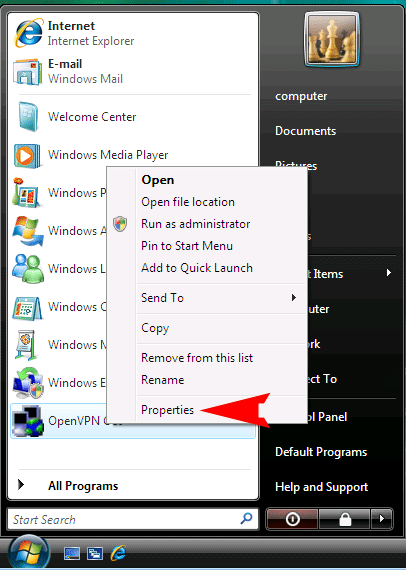
1) Right click on the ‘OpenVPN GUI’ icon in the start menu and select ‘Properties’.
The screen that pops up looks like:
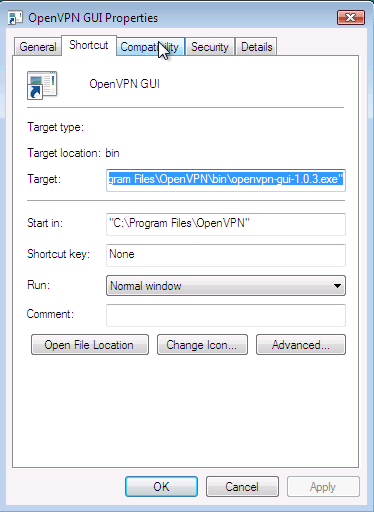
Click on the ‘Compatibility’ tab and the following window will pop up:
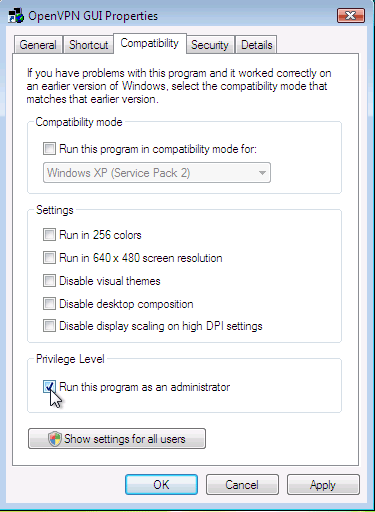
Click on the ‘Run this program as an administrator’ box and then select ‘OK’. Reboot your computer to clear out any programs currently running.
Test to make sure everything is working properly. Double click on the ‘OpenVPN GUI’ desktop icon or go to the Start menu and click on ‘OpenVPN GUI’. The application will launch the GUI icon into the system tray. Now, right click on the icon as normal and select ‘connect’ *. Log into the service with your user name and password. Now, click here to check your IP address. If you see our location and server address then you are good to go. If you see your location, go back to the window above and make sure the ‘Run this program as administrator’ box is checked. If it still does not work, send us and email, include a copy of your log file**, and we will help you set it up.
Now that you are connected, you can unblock sites and ensure your VPN privacy.
* If you have multiple configurations for the EU servers, TCP servers etc. then select the configuration and then connect.
** To get the log file right click on the tray icon, select ‘View Log’ and copy and paste the contents into the email.