Setup:
On Windows Vista, you will need to run the OpenVPN installer with administrator privileges so that it can properly install the TAP driver which makes the VPN work.
Right-click on the installer that you downloaded and select ‘Run as administrator’

For additional screen shots of the setup process, see the Vista install screen shots page
Operation:
After installing, you will need to right-click on the OpenVPN GUI icon and select ‘Run as administrator’ which allows OpenVPN to add routes to the routing tables that are pulled from the SurfBouncer server
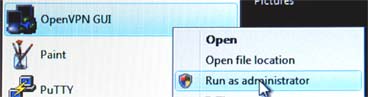
To avoid having to do this every time, you can set up the file to have these permissions as your default by following the instructions on the OpenVPN Vista Permission page (probably the best long-term approach to simplify Vista startup)
Vista has a feature called UAC (User Account Control) which prevents programs running under administrator accounts from having administrator access. This feature causes OpenVPN to not run properly which is why you have to right click and run the application as administrator. In some cases, Vista is configured in such a way where the ‘Run as administrator’ command is ignored. Should this occur, follow the directions here to disable the UAC.